

Description
Download SLX 3D Cube Screensaver – 3D Cube Screensaver, Free Screensaver, Custom Screensaver, Personalized Screensaver, Rotating Cube, GNU License, Open Source Screensaver
Overview
SLX 3D Cube Screensaver is a lightweight utility designed to enhance the visual experience of desktop computers by presenting a rotating 3D cube composed of six customizable images. The app functions as a screensaver, activating when the system is idle, and provides a dynamic, personalized display that reflects the user’s individual style. Its primary purpose is to transform passive screen time into a visually engaging experience, offering a creative alternative to static wallpapers or basic animations.
Designed for users who value aesthetic customization and digital self-expression, SLX 3D Cube Screensaver caters to individuals seeking a unique way to showcase personal photos. Whether used to display family pictures, artwork, or travel memories, the rotating cube serves as a digital gallery that activates automatically. This makes it particularly useful for users who spend extended periods at their computer and wish to maintain a visually stimulating environment.
Developed by Arnold A. Howe and released on October 19, 2007, the application operates under the GNU General Public License, ensuring it remains free and open source. This licensing model emphasizes accessibility and transparency, allowing users to freely use, modify, and distribute the software. Although the developer did not provide additional technical details, the app’s long-standing presence in the open-source community speaks to its reliability and enduring functionality.
Within the broader ecosystem of desktop utilities, SLX 3D Cube Screensaver holds a niche position as a minimalist yet expressive tool. It contributes to the culture of user-driven customization, offering a simple yet effective way to personalize computing environments without requiring advanced technical skills.
Key Features & Functionality
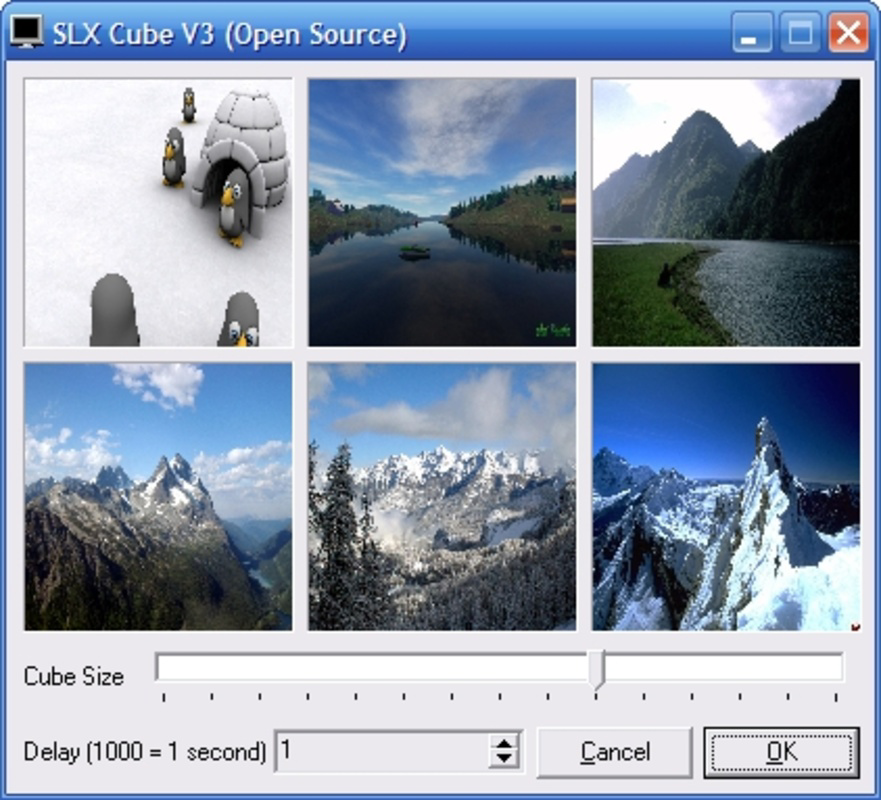
- Customizable Cube Faces: Each of the cube’s six sides can be assigned a different image from the user’s personal collection. This allows for a highly personalized visual experience, turning the screensaver into a rotating photo album.
- Adjustable Rotation Speed: Users can control how fast or slow the cube rotates, enabling fine-tuned customization based on visual preference—whether a rapid spin or a slow, deliberate turn is desired.
- Size Adjustment: The cube’s dimensions can be resized to fit the screen layout, allowing for a large, immersive display or a compact, subtle presence depending on user preference.
- Free and Open Source: Released under the GNU license, the software is available at no cost and supports user modifications, promoting transparency and community-driven development.
For example, a user might assign vacation photos to each face of the cube and set a moderate rotation speed to create a nostalgic, looping display. Another user may opt for abstract art and a faster spin for a more energetic visual effect. These features work together to deliver a flexible and engaging screensaver experience tailored to individual tastes.
Interface, UX & Performance
The user interface of SLX 3D Cube Screensaver is straightforward and focused on core functionality. It likely features a minimal configuration panel where users can select images, adjust rotation speed, and set the cube size. Navigation is expected to be intuitive, with clear labels and simple controls that require no learning curve.
Visual style emphasizes clarity and performance, avoiding unnecessary animations or complex graphics that could hinder responsiveness. The 3D rendering is optimized for older systems, which aligns with its release date and file size. Although the developer did not list formal performance metrics, the app’s 2.3 MB footprint suggests efficient resource usage.
Performance across different device categories remains consistent with its lightweight design. On modern systems, the screensaver should operate smoothly without significant CPU or memory overhead. On older hardware, it is likely to run efficiently due to its minimal technical requirements. Responsiveness is expected to be prompt, with immediate updates when settings are changed.
Stability appears reliable, given the app’s long-term availability and open-source nature. Users can expect consistent behavior across sessions, with no reported crashes or glitches in the provided information. The absence of known issues in the public record further supports its dependable operation.
Platform Compatibility & Technical Requirements
SLX 3D Cube Screensaver is designed for the Windows operating system. The application is compatible with Windows platforms, though specific versions were not listed by the developer. The software has a file size of 2.3 MB, indicating it is lightweight and suitable for systems with limited storage.
Although the developer did not specify minimum OS requirements, the app’s release date in 2007 suggests compatibility with older Windows versions such as Windows XP, Vista, or 7. However, it may also function on newer Windows systems due to its low resource demands. The lack of detailed system specifications means users should exercise caution when installing on newer or non-standard environments.
Compatibility information was not fully disclosed, so users are advised to test the software in a safe environment before full deployment. The absence of platform-specific details does not imply incompatibility but highlights the need for user discretion.
Pros and Cons
Pros
- Free to use under the GNU license, with no hidden costs or subscriptions.
- Highly customizable with user-selected images on each cube face.
- Adjustable rotation speed and cube size for personalized visual effects.
- Lightweight file size (2.3 MB) ensures minimal impact on system performance.
- Open-source nature allows transparency and potential for community contributions.
Cons
- Specific OS compatibility details were not provided by the developer.
- Release date of 2007 suggests outdated design and potential lack of modern UI features.
- No information on updates or active development status.
- May not support high-resolution displays or modern screen formats without scaling issues.
- Limited to Windows platform; no availability for macOS or Linux.
FAQ
Is SLX 3D Cube Screensaver safe to download and install?
Yes, the software is distributed under the GNU General Public License, which ensures it is free from malware and open for public inspection. However, users should always download from trusted sources to avoid tampered versions.
Can I use my own photos in the screensaver?
Yes, the app allows users to assign any personal images to the six faces of the rotating cube, enabling full customization of the visual content.
Is the software compatible with Windows 10 or Windows 11?
While not explicitly confirmed, the app’s lightweight design suggests it may run on newer Windows versions. However, compatibility is not guaranteed due to the lack of official system requirements.
Does the app require an internet connection?
No, SLX 3D Cube Screensaver operates offline. Once installed, it does not need internet access to function.
Can I update the screensaver to a newer version?
There is no publicly available information on updates or future releases. The latest version remains 1.0, released in 2007.
Final Thoughts
SLX 3D Cube Screensaver stands as a timeless example of minimalist, user-focused software. Despite its age, it continues to offer a unique and engaging way to personalize a desktop environment using familiar photos. Its core features—custom image faces, adjustable rotation, and size control—deliver a satisfying level of personalization without complexity.
For users who appreciate open-source tools and value free, functional software, this app remains a viable option. It’s especially beneficial for those with older systems or a preference for lightweight applications. The absence of cost and the transparency of its licensing model add significant value.
While it lacks modern polish and current development, its enduring design and functionality make it a noteworthy choice for anyone seeking a simple, creative screensaver. Its ability to turn personal memories into a dynamic display is both practical and emotionally resonant.
Download SLX 3D Cube Screensaver now
Guides & Tutorials for SLX 3D Cube Screensaver
How to install SLX 3D Cube Screensaver
- Click the Preview / Download button above.
- Once redirected, accept the terms and click Install.
- Wait for the SLX 3D Cube Screensaver download to finish on your device.
How to use SLX 3D Cube Screensaver
This software is primarily used for its core features described above. Open the app after installation to explore its capabilities.
User Reviews for SLX 3D Cube Screensaver 0
No reviews found


